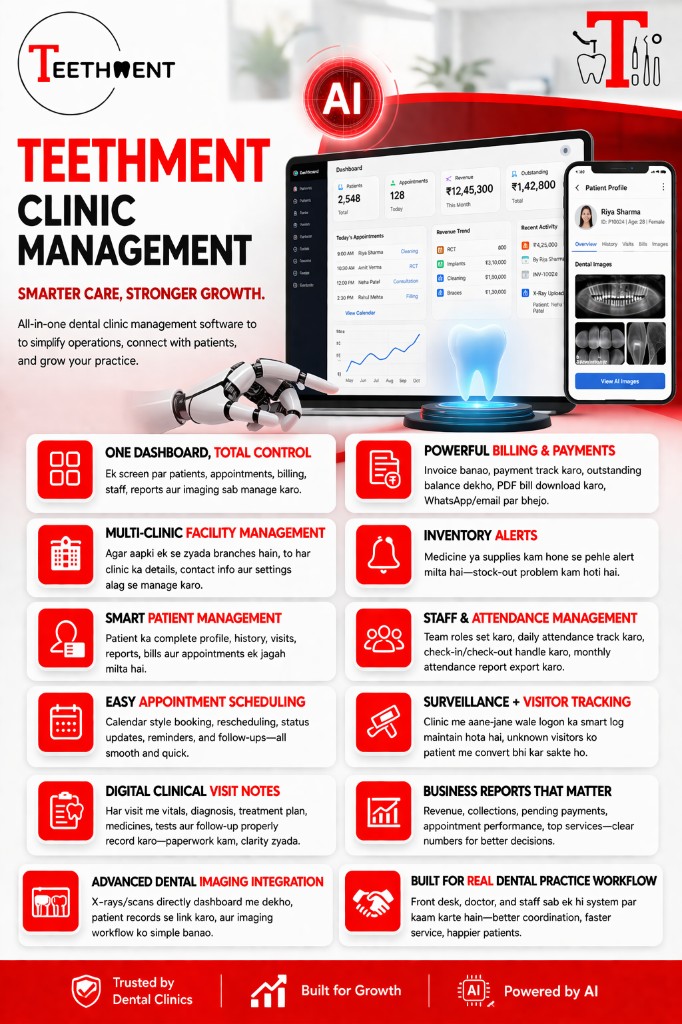

Running an independent dental clinic in India involves navigating high fixed overheads, volatile footfalls, and demanding administrative routines. While practitioners invest significantly in modern dental units, compressors, and sterilization autoclaves, operatory chairs often sit vacant during late mornings and mid-afternoons due to unstructured walk-ins and forgotten appointments. At the same time, front-desk staff frequently struggle with paper ledgers, manual phone calls, reconciling UPI collections, and issuing GST-compliant receipts during evening rush hours. Without synchronized chair booking and patient communication, dental practices face avoidable revenue leakage, chaotic waiting areas, and underutilized clinical capacity.
Structured Chair Scheduling and Calendar Control
In a dental practice, a chair represents productive clinical capacity. Unlike general outpatient clinics where consultations happen across a desk, dental procedures require specific operatories, instrument sets, and dedicated procedural duration. Treating operatory availability as a generic doctor calendar leads to bottlenecks, where two patients arrive for long endodontic procedures at the same time while other chairs remain empty.
Using the appointment calendar within the Teethment practice console, clinics assign specific chair or room slots to every booking. Front-office teams can designate chairs based on procedural requirements—reserving operatory one for routine scaling and diagnostic consults, while keeping operatory two open for prolonged surgical extractions or crown preparations. By organizing the daily schedule around distinct chair blocks, receptionists prevent overlapping bookings, give attending dentists realistic procedure buffers, and ensure assistants have adequate turnover time to disinfect equipment between visits.
Structured chair allocation also accommodates the unpredictable flow of Indian dental practices, where urgent emergency visits for toothaches often disrupt pre-booked schedules. With clear visibility across chair slots, front-desk coordinators can immediately identify open operatories or short procedure gaps to seat walk-in patients without delaying patients who booked days in advance.
Reducing No-Shows with Automated Patient Reminders and Messaging
Missed dental appointments waste productive chair capacity that cannot be recovered. In urban centers and tier-2 towns alike, patients regularly skip or delay scheduled sittings because of commute challenges, changing work hours, or simply forgetting their upcoming dental session once acute pain subsides.
Structured patient messaging resolves this friction by sending timely reminders directly to the patient before their slot. Rather than relying on staff to manually dial dozens of patients every morning, the system handles appointment reminders consistently. Patients receive confirmation of their booked date, time, and chair slot, reinforcing their commitment to attend.
When unexpected conflicts arise, advance reminders give patients the opportunity to notify the clinic ahead of time. This early warning enables the front desk to reassign the freed chair slot to follow-up visits or emergency walk-ins. Beyond immediate appointments, the patient messaging system powers recalls and follow-ups. Dental health requires periodic evaluation, such as six-month hygiene check-ups, post-extraction suture removals, and restorative reviews. Automated recall communication ensures patients return at appropriate clinical intervals, maintaining chair occupancy throughout the year.
Unifying Patient Records, Treatment Plans, and Imaging at the Chair
Efficient chair turnover depends on having clinical context immediately available the moment a patient sits down. Searching through paper folders or fragmented computer drives while a patient waits in the operatory wastes precious chair time and interrupts clinical focus.
Immediate Access to Patient Records
Through the Teethment practice console, the dentist accesses comprehensive patient records directly at the operatory terminal. The system stores essential demographics alongside an organized visit history. Dentists can review previous interventions, medical histories, drug allergies, and past complaints within seconds, ensuring clinical decisions are fully informed without requiring staff to pull physical files from storage.
Phased Treatment Plans and Informed Consent
Complex dental cases—such as full-mouth rehabilitation, multi-stage endodontics, or orthodontic corrections—rarely happen in a single sitting. The treatment plans module enables practitioners to map out phased procedures clearly. Clinicians outline the sequence of visits, document clinical objectives for each stage, and record patient consent before starting invasive procedures. Documented consent protects the clinic and gives patients clarity on what each chair session involves and why multiple visits are necessary.
Integrated Imaging on the Patient Chart
Diagnostics in modern dentistry rely heavily on visual evidence. The platform allows clinics to store X-rays and intraoral photos directly on the patient chart. When performing an extraction or evaluating root canal obturation, the clinician can view radiographic imaging right alongside the active procedure notes. Having diagnostic imaging instantly visible on chart eliminates toggling between third-party viewers and keeps chairside workflows smooth.
Front-Desk Operations and Clinic Billing
A well-managed operatory workflow must conclude with transparent financial reconciliation at the front desk. Delays during invoicing cause patient queues at the counter, tie up administrative staff, and lead to discrepancies between services delivered in the chair and fees collected.
The clinic billing module bridges the operatory and the reception desk. Once a procedure concludes, the front desk generates invoices based on the completed treatment plan items. Invoices reflect itemized charges, applicable discounts, and GST breakdowns for cosmetic or non-exempt treatments where required. Staff can track collections across multiple payment modes, recording direct cash settlements, card swipes, or patient UPI transfers against the active invoice.
For multi-sitting treatments, billing records keep a clear ledger of advance deposits, pending balances, and total collections per visit. This structured ledger prevents payment disputes, ensures all delivered clinical work is accounted for, and gives clinic managers a clear picture of daily revenue collections during evening reconciliation.
Daily Clinical Workflow on the Teethment Practice Console
Adopting a structured digital schedule standardizes clinic routines from morning opening to evening closing:
- Morning preparation: The clinic administrator opens the appointment calendar, reviews booked chair slots, and notes upcoming surgical or restorative cases to ensure instruments are prepared in advance.
- Patient arrival: The front desk marks the patient as arrived, verifies demographic details in the patient records, and directs them to the designated chair without administrative delays.
- Chairside care: The dentist accesses visit history, reviews linked X-rays on the chart, confirms the current stage of the phased treatment plan, and records updated notes during the procedure.
- Checkout and billing: The front desk generates the invoice, records payments received via UPI or cash, issues a GST invoice, and confirms the next follow-up slot on the calendar.
- Evening closure: The receptionist checks daily collections, reviews upcoming appointments for the next day, and confirms automated reminders and recalls have been dispatched.